
- Published on
Story Engine Release
- Authors

- Name
- Tony
- @shyeditor
Introducing Story Engine: Plan, Outline, and Draft Your Novel in One Place
We're excited to announce Story Engine, the biggest new feature to come to ShyEditor this year.
Story Engine is an all-in-one planning tool that lets you go from a blank page to a full novel plan — complete with prose drafts — in a single session. Define your world, generate a chapter outline, preview your prose, and iterate on all of it without leaving the workspace.
How it works
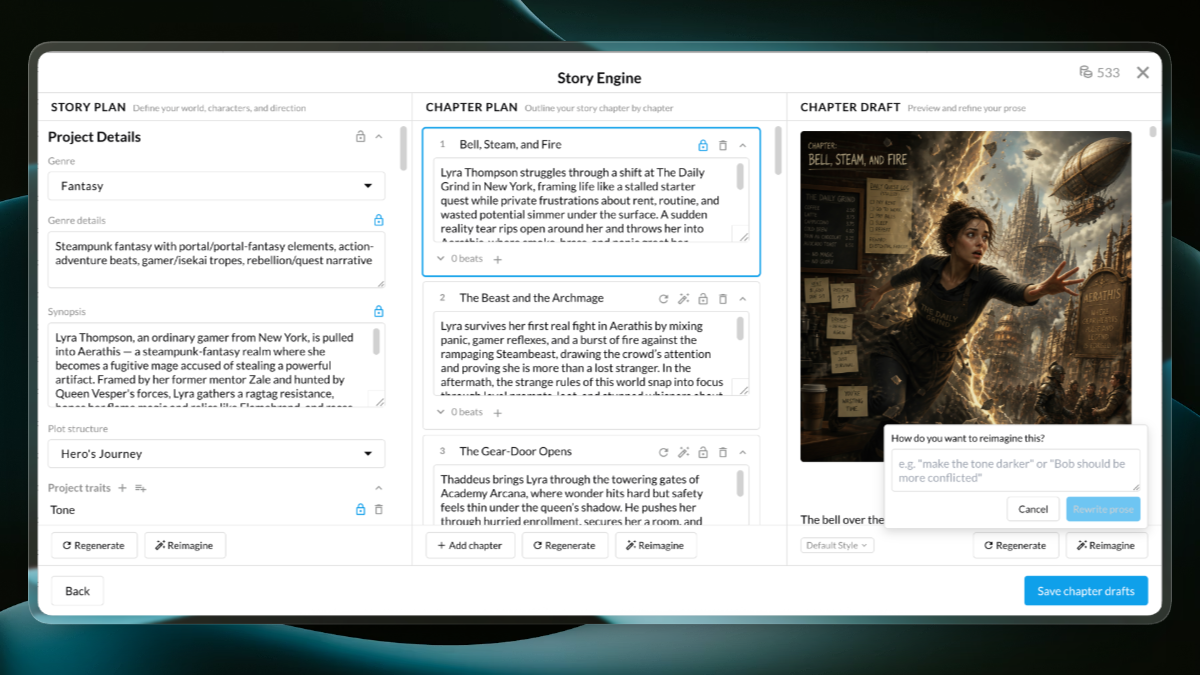
Story Engine is organized into three columns that mirror the natural flow of writing a novel:
Story Plan is where you define the foundations. Pick a genre, describe the world, write (or generate) a synopsis, and choose a plot structure — anything from the classic Three-Act to Hero's Journey to Kishotenketsu. You can add project traits like tone, themes, and audience, and pull in characters, locations, and other entities from your Knowledge Base.
Chapter Plan is where structure takes shape. Story Engine generates a full chapter-by-chapter outline tailored to your story, with titles, summaries, and optional scene-level beats. Drag chapters to reorder them, add new ones, or remove the ones that don't fit.
Chapter Draft is where you see your story come to life. Generate prose previews for any chapter, pick a writing style, and even create chapter illustrations. When you're happy with a draft, save it straight into your project as a sheet.
Iterate until it feels right
The real power of Story Engine is in the iteration loop. Every field — genre details, synopsis, character names, chapter summaries, prose drafts — can be individually locked or regenerated. Lock the pieces you love, then hit Regenerate to get fresh ideas for everything else. The locked content stays exactly as you left it and informs everything that gets rebuilt around it.
Want more control? The Reimagine button lets you give natural-language direction: "make the tone darker," "Bob should be more conflicted," "add a twist at the midpoint." Story Engine regenerates the unlocked fields following your instructions.
Start from scratch, or start from what you have
If you've already been building out your project — writing a synopsis, filling in your Knowledge Base, sketching an outline — Story Engine picks all of that up automatically. Your existing work becomes the starting point, pre-locked so nothing gets overwritten. It meets you where you are.
And if you're starting fresh? Just pick a genre and go. Story Engine can generate everything from there.
Credits and availability
Story Engine uses 1 AI credit per text generation (each field, each chapter summary, each prose draft) and 10 credits per chapter illustration. It's available now on any novel project — open the Assistant panel and look for Story Engine.
Happy writing.